







- Home
- What's new at FocalScope
- Agent training mode
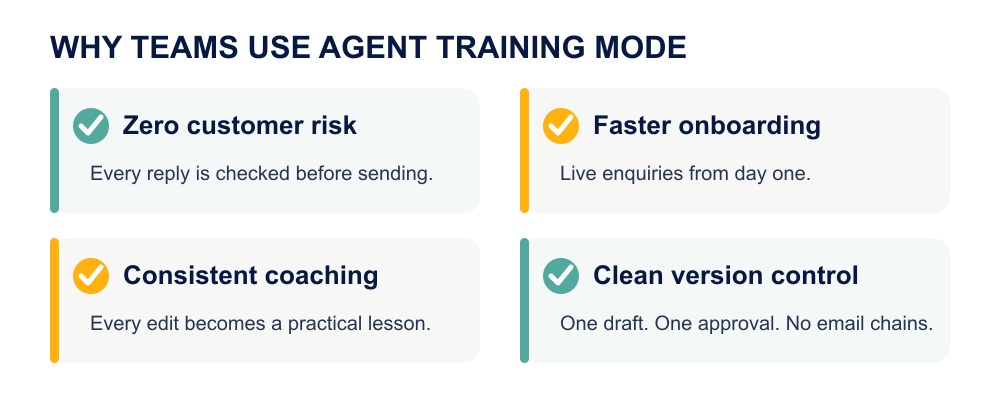
Let new agents answer real customer emails from day one, while a supervisor reviews every reply before it reaches the customer, so nothing risky slips through unseen.

What is Agent Training Mode?
Who should use Agent Training Mode?
This kind of supervised email support training fits any team onboarding new hires onto a shared inbox or ticketing queue, including:
- Contact centres and BPOs
- Help desks and shared inbox teams
- SaaS support teams
- Travel support
- E-commerce and retail support
- Financial services
- Healthcare support
This agent training workflow is a smart solution anywhere email is an essential support channel and a mistake in writing carries real weight.
How it works
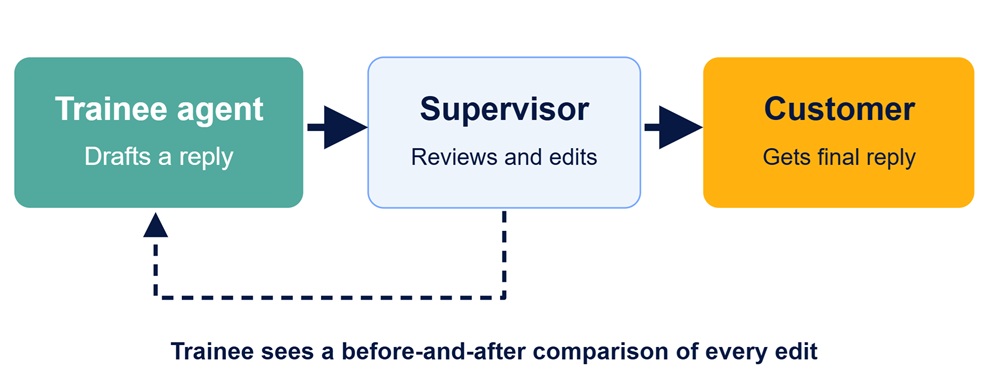
- Pair a trainee agent with a supervisor in FocalScope’s settings.
- The trainee replies to a real customer email, as normal.
- FocalScope routes the draft to the supervisor’s queue instead of the customer’s inbox, as part of the platform’s email QA workflow.
- The supervisor edits or approves the reply.
- Approving sends the final version to the customer, under the trainee’s name.
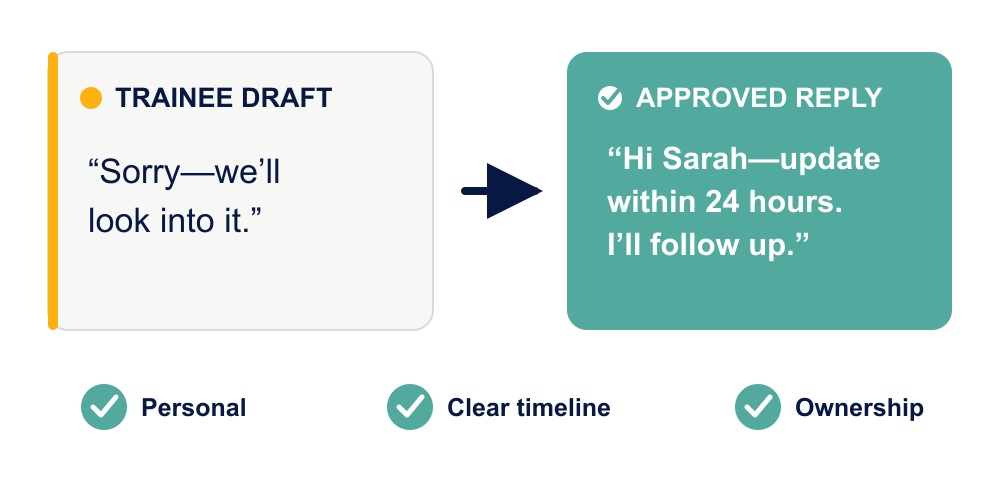
- The trainee receives a copy showing exactly what changed, so every correction becomes a lesson.
Supervisors and trainees can flag tricky cases to each other using FocalScope’s notes and chat, without switching tools. Our customer service agent training mode works alongside FocalScope’s shared inbox email ticketing, and supervisor dashboard, and pulls from the same knowledge base that agents already use to answer tickets.
Agent Training Mode vs. the alternatives
| Method | Real customers | Supervisor approval | Customer risk | Onboarding speed |
| Shadowing / simulation | No | N/A | None | Slow |
| Unsupervised live access | Yes | No | High | Fast |
| Agent Training Mode | Yes | Yes | Low | Fast |
Unsupervised access puts agents on real customer tickets right away, so ramp-up is fast, but any mistake reaches the customer before anyone catches it. Shadowing removes that risk almost entirely, but agents build real skills more slowly, since they aren’t handling live, varied situations.
Agent Training Mode is built to close that gap. New agents work on real tickets from day one, but every reply is routed to a supervisor for review before it reaches the customer. That keeps onboarding speed on par with unsupervised access, while keeping customer risk on par with shadowing.
The trade-off comes down to when mistakes get caught, not whether they’ll happen. Unsupervised access catches them after the customer has already seen them. Shadowing catches them before the agent ever touches a real ticket, at the cost of slower ramp-up. Agent Training Mode catches them in between: on real tickets, before the customer sees anything
Common questions about Agent Training Mode
Who is Agent Training Mode designed for? New or struggling email support agents who already have basic product knowledge and are ready to handle real customer enquiries, under review.
Does the customer know their reply was reviewed? No. During the email support training period, the customer only sees the final, approved message, sent under the trainee’s name.
Does this slow down response times? It adds one review step, so response time depends on how quickly the supervisor checks the queue. Teams typically offset this by capping how many trainees report to one supervisor, or by treating customer service agent training replies as a priority queue for the supervisor.
How many trainees should each supervisor manage? Many teams cap it at three to five trainees per supervisor during onboarding, so the approval queue keeps moving and doesn’t become a bottleneck.
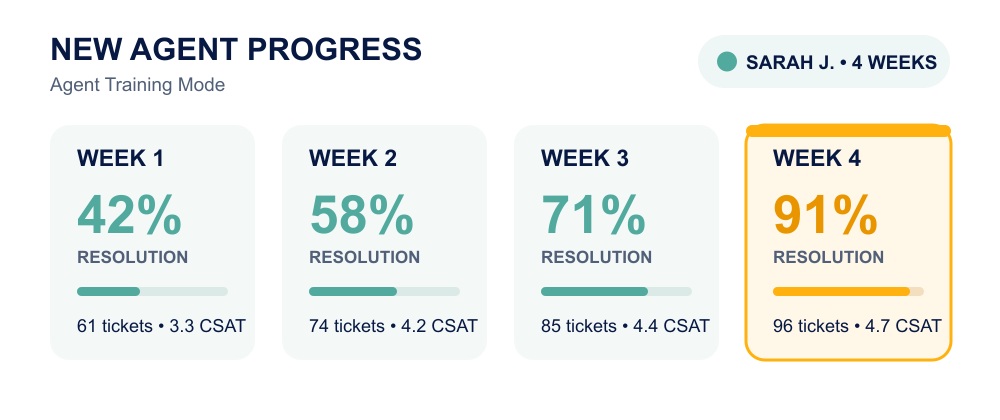
When should agents leave Training Mode? Once an agent’s replies are consistently approved with little or no editing, most teams move them off email support training mode gradually, reducing review frequency before removing it entirely, rather than switching it off in one step.
Can a supervisor approve without editing? Yes. If the draft is ready to go, the supervisor approves it as-is and it’s sent unchanged.
Is Agent Training Mode only for email? Yes, it’s built specifically for email replies. Other channels have their own monitoring and coaching tools inside FocalScope, since live channels like phone and chat need a different kind of oversight than a written draft that can be held and edited before it’s sent.
Can a trainee see what the supervisor changed? Yes. Trainees receive a copy of both versions, so they can see exactly what was edited and why.
Why review-before-send catches more than review-after-complaint
Most training feedback happens after a customer has already seen the mistake: a bad reply, a complaint, then a coaching conversation. Agent Training Mode moves that review earlier: the supervisor sees the draft before it leaves the queue, so a wrong price, a missed policy detail, or an off-tone reply gets fixed on the spot, not flagged after the fact.
Many teams start with every email reviewed, then gradually reduce supervision as the agent consistently meets quality targets, rather than removing oversight all at once.
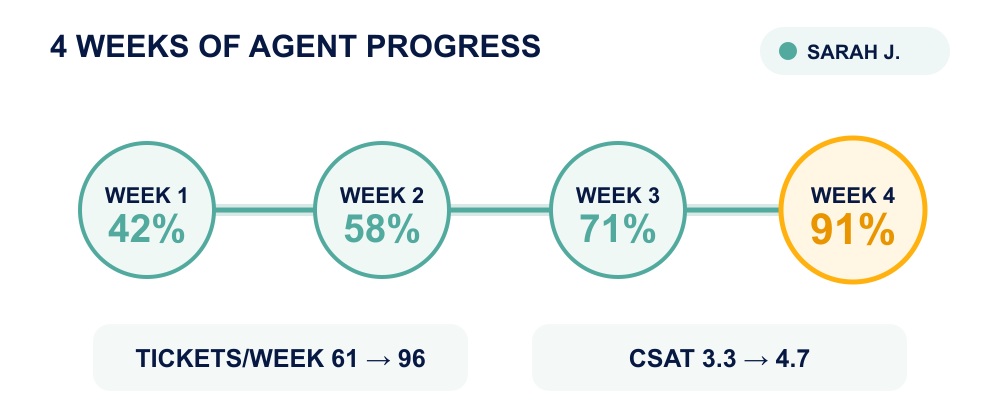
Metrics to track once an agent comes off Training Mode
- First response time
- Resolution time
- First-contact resolution rate
- CSAT
- NPS
- Individual ticket volume
Watching these, rather than instinct alone, tells you when an agent is ready to work independently.
Related Topics


Custom Wiki Knowledgebase

Call Routing &
SLA Customisations
The takeaway
Agent Training Mode helps support teams onboard new agents faster without exposing customers to avoidable mistakes. By reviewing every reply before it’s sent, supervisors can coach in real time, maintain response quality, and give trainees practical experience from their first day handling live email support. Already using FocalScope? Here’s how to set this up.
Looking for a new omnichannel communication solution? Request a demo to see FocalScope Mobile in action to see Agent Training Mode running on your own email queues.